

Website usability is one of the most important factors when creating a website. Our focus should always be on how potential customers will interact with our site and how they will accomplish what they need to do. This is where a site search feature can be a real benefit to the majority of websites.
We talk a lot about information architecture when we’re working on website briefs with our clients. It’s not about the content on your site (although this is hugely important too), it’s about how you arrange that content in such a way that your users can find everything they need easily, with just one or two clicks from your homepage. When we’re building our own websites, we can get hung up on the content itself and simply structure the website how we think it should be or how we want customers to find it. The reality is that customers will use our site differently to how we do, so being able to put yourself in your customer’s shoes is a great skill to learn when you’re planning your website structure. If in doubt, ask a friend or colleague to browse the site as a customer would and get some real, honest feedback!
How site search benefits users
If you have a relatively small website (less than 20 pages, for example), it’s much easier to organise the content in a user-friendly way, than if you have a large website (1,000+ pages for example). Think of Amazon UK as a good example of a large website. They have around 50 million pages indexed by Google just on their www.amazon.co.uk domain (not including their other subdomains like music.amazon.co.uk, primenow.amazon.co.uk, flex.amazon.co.uk or relay.amazon.co.uk). 50 million! 50,000,000!!
Not to mention the fact that their customer base is huge and their motivations for visiting Amazon will vary massively. Building a logically structured website, catering for all these individual buyer journeys would be impossible to do well. Thankfully, Amazon has a search feature!
When’s the last time you tried to locate a product on Amazon without using the search feature? It’s a challenge we set our training delegates – find me product XYZ without using the search, only using the categories and filtering options. We set them a time limit and see how many can find what we’re looking for. It’s a fun exercise, but highlights an important fact: without the search feature, Amazon would be a nightmare to use, people would get frustrated and shop elsewhere. Their site search is their saviour!
Site search is not only a necessity for large websites, it’s a time saving tool for a subsection of your customers; the ones who don’t want to wander aimlessly round your website in search of answers, they know exactly what they’re looking for and just want to be taken to that page on your website.
The site search provides a way of bypassing your navigation system and giving users a direct line to what they want. With this in mind, the search feature shouldn’t just be reserved for larger sites; it’s going to add value to any website.
How site search benefits you
Firstly, if you’re able to present relevant content to your users quickly without them having to dig deep into your site’s content structure, you’re more likely to retain those visitors, give them a great user experience and convert them into leads or paying customers. Who doesn’t want that?
But, aside from the obvious business benefits, there’s another reason to have a site search feature on your website. Content ideas!
With Google Analytics installed on your website, you can track what people type in to the search feature.
Here’s how!
Step 1: You’ll need your site search’s ‘Query Parameter’. To find this, simply do a search on your site and note down the URL of the search results. Here’s what that looks like on the Skittish website when we did a search for “ecommerce”: https://skitti.sh/?s=ecommerce
The query parameter is the bit after the ? and before the =. So, in this case, our query parameter is ‘s’
Step 2: Log in to your Google Analytics account and go to your Admin section (cog icon bottom left)
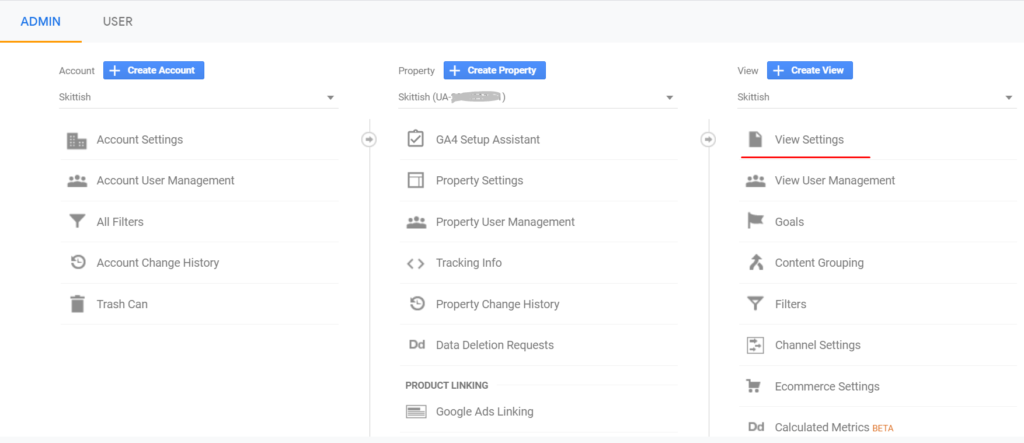
Step 3: Under View Settings (far right column), scroll down to Site Search Settings
Step 4: Turn Site Search Tracking on and add your query parameter into the field and click ‘save’
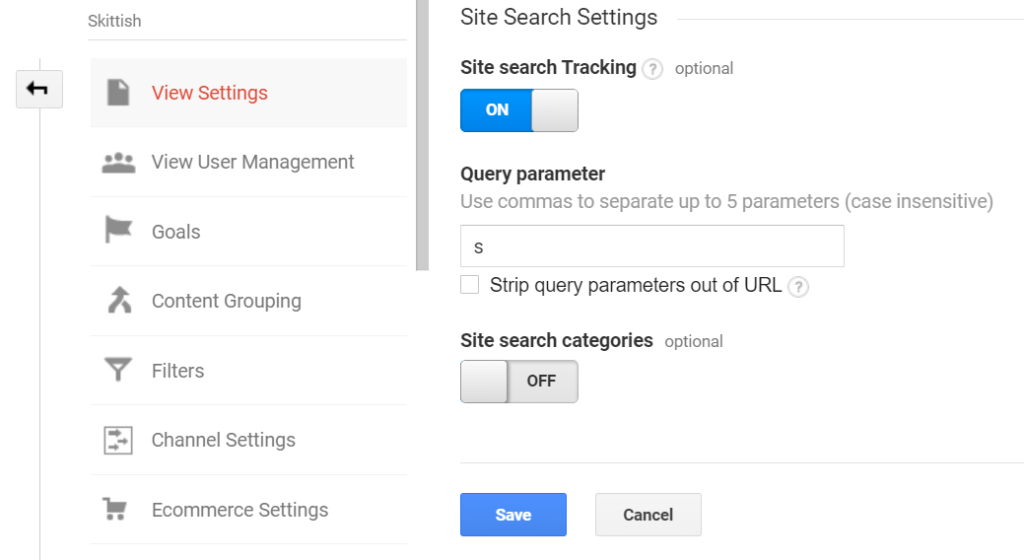
You’ll now start seeing your search terms in your reports under Behavior > Site Search
This gives some really useful insights into the content people are looking for and you can use this to refine and guide your content strategy and ultimately increase conversions.
For example, if you find it’s the same topics or search terms being typed in consistently, and you know you have content relevant to their search, maybe that content isn’t intuitive to find. Maybe it needs to be more prominent on your site with a link from your home page or in the main navigation.
If you find people are searching for content that you don’t have, there’s an opportunity to create this content. Whether it’s a blog post or an additional page on the site, it can give you valuable content ideas to cater for your users’ needs.
Site search has benefits, not just for the user, but for you, the website owner, too. So if you don’t have a search feature, it’s time to look at adding one. If you have one, but are not tracking its use, now’s the time to set this up and start reporting on search terms.
Found this useful? Let us know in the comments and feel free to share with your network.
Leave a Reply